

Any ecommerce brand whose customers recommend it can create a referral programme. Set a goal and a cost limit, choose a reward for each side, fix the rules, invite customers straight after they buy, give friends a branded page to claim a single-use code, reward completed referrals and track the results.
A referral programme, often called a refer-a-friend scheme in the UK, rewards customers for recommending you to people they know and pays out only when those people buy. The seven steps below show how to create a referral programme in the order most ecommerce brands launch one. They suit CRM and ecommerce teams setting up their first programme, and teams rebuilding one that has started to leak discounts. Most of the hard decisions sit in steps 2 and 3, where the rewards and rules decide what each referred customer costs you.
What do you need before you create a referral programme?
A referral programme rewards recommendations customers would make anyway, so it works best for brands with healthy repeat purchase and good reviews. Most of what has to be ready before launch is operational.
- A way to identify each referrer at the moment you invite them, usually the email address on their order or account.
- A way to issue each person a unique referral code or link, from your ecommerce platform or a referral tool. One shared code can’t tell you who referred whom.
- A clear definition of a new customer, such as no previous order on that email address.
- A budget owner for rewards, usually the acquisition or CRM team.
- Terms and conditions written for customers, because friends read them before they claim an offer.
How to create a referral programme in 7 steps
Creating a referral programme follows the order a referral happens in, from what a new customer is worth to the reward that closes each referral.
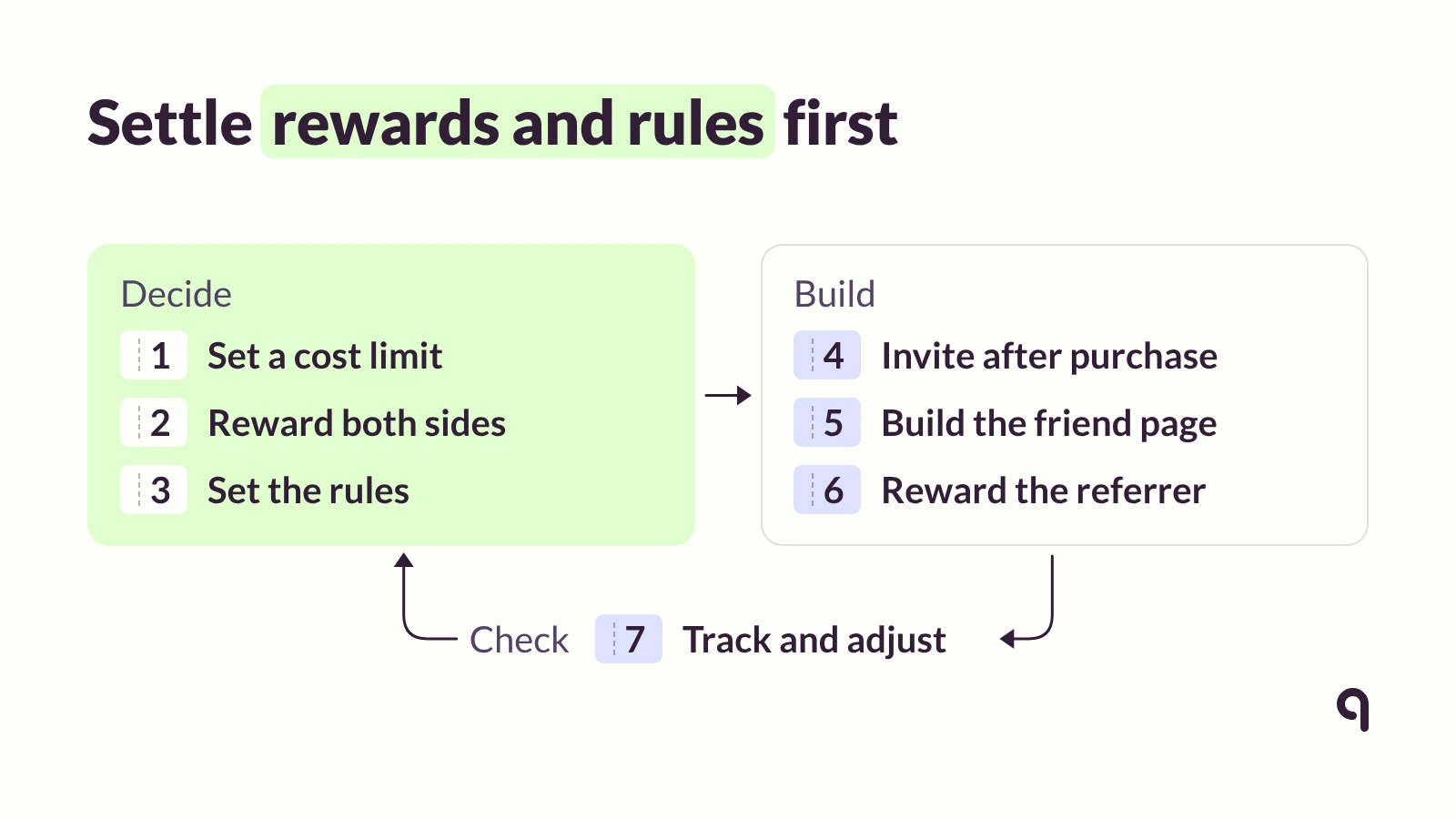
Step 1: Set a goal and decide what a new customer is worth
Start with one goal, usually first orders from new customers, and the most you’ll pay for each one. Compare that ceiling with what a new customer costs you through paid search, paid social or affiliates. The ceiling decides how generous the rewards in step 2 can be, and it gives you a number to judge the programme against after launch. Decide at this stage whether a minimum order value applies, because a very small first order can cost more in rewards than it earns.
Step 2: Choose a reward for the referrer and the friend
Reward both sides. The friend needs a reason to place a first order, so their reward is usually a discount on it. The referrer needs a reason to share, so theirs can be a discount on their next order, account credit or loyalty points if you run a points scheme.
The two rewards don’t have to match. Keep each one simple enough to explain in a single line on the invitation, and keep the pair within the ceiling from step 1.
Step 3: Set the rules before anyone shares
Rules decide what happens when a code travels further than you meant it to. Give every friend their own single-use code that only works for a new customer, so a code posted on a voucher site works once and then stops. Add an expiry date to each code, limit how many friends one customer can refer each day and overall, and give the programme start and end dates, or no end date if it runs all year. Write all of this into the terms friends see before they claim.
Step 4: Invite customers to refer straight after they buy
The order confirmation page is the strongest place to ask, because the customer has just chosen you and you already know who they are. Show the invitation as an overlay with a short delay, so it doesn’t cover the order details, and give each customer a personal referral link to copy and share anywhere, plus an email option with the message already written. In Uniqodo, Onsite Experiences serves this invitation as a branded overlay, with display rules that set the page it appears on and when.
Step 5: Build a branded page where friends claim their code
The referral link should open a page that looks like your site, with your logo, an image, a headline naming the offer, a line on the terms and a button. The friend enters an email address, receives their own code and goes on to the shop. Asking for the email first lets the programme check the friend is new, tie the code to one person and match the eventual order back to the referrer.
Step 6: Reward the referrer once the friend’s order completes
Pay the referrer when the friend’s first order completes. Programmes that reward a click or a sign-up end up paying for fake accounts and self-referrals. Send the referrer their reward code by email once the order qualifies. If your category has a high return rate, decide whether an order qualifies at dispatch or only once the returns window has closed.
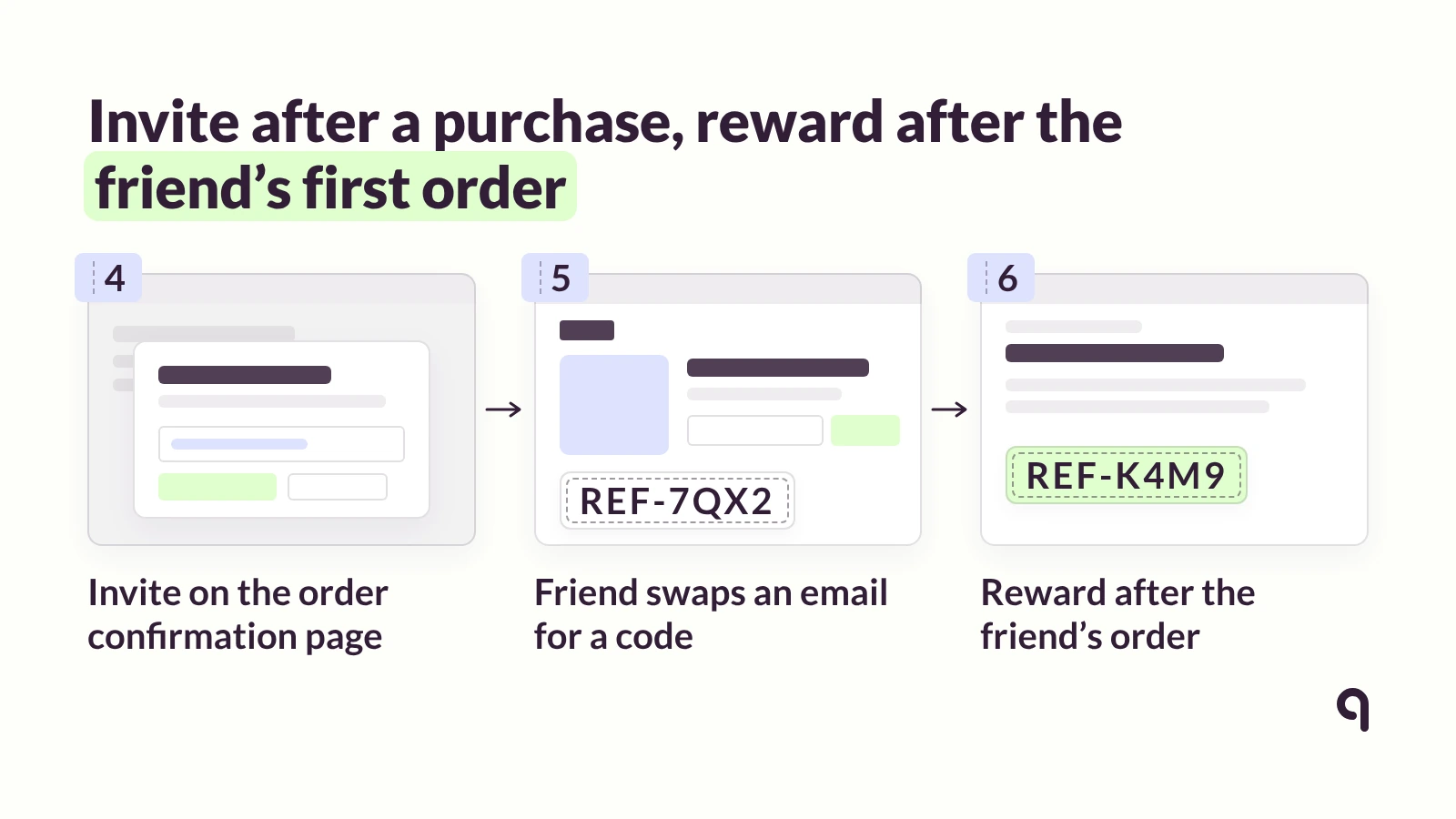
Step 7: Track results and change one thing at a time
Track the programme as an acquisition channel: invitations shown, friends who claim a code, codes redeemed, first orders and reward cost per new customer. Set that cost against the ceiling from step 1 and against your other channels, and watch your referral rate over time. Change one thing at a time, such as the reward, the wording or where the invitation appears, so you can see what moved the numbers.
What mistakes stop a referral programme from working?
Each of these mistakes is made before launch, so a pre-launch check catches all three.
- Launching without a real test. A friend page that redirects to the wrong place, or a code your checkout rejects, doesn’t show up in an admin screen. Run one referral through the whole path before launch: share, claim, order and reward email.
- A friend offer that’s weaker than your public offers. If a sitewide code beats the referral discount, friends use that instead and the referrer never gets credit. Check the friend reward against every live promotion.
- Letting referral codes stack with other promotions by accident. A friend who combines a referral code with a sale code can end up with a discount nobody approved. Decide whether stacking is allowed and set it in the code rules.
How does Uniqodo help brands create a referral programme?
Uniqodo’s referral software handles steps 3 to 6 for ecommerce brands, with a quick JavaScript integration and no promotion engine required. The brand sets the friend’s and referrer’s rewards as two separate promotions, plus programme dates and daily and overall limits for each referrer. It supplies its logo, image and copy for the friend page, which Uniqodo builds and hosts.
Each referred friend gets a unique, single-use code that only works for a new customer, and the referrer receives a reward code by email once the friend completes an eligible purchase. Brands can then see each referrer and their referral activity in Uniqodo.
Brands that already send their orders to Uniqodo don’t need a separate call to record friend purchases, because those orders are captured automatically. Teams that want to build the whole experience themselves can use the Referral API instead, which registers referrers, issues friends’ codes and records friends’ purchases.
How to create a referral programme: FAQs
How much should a referral reward be?
There’s no standard figure. Work back from what a new customer is worth to you and what you already pay to acquire one through paid search, paid social or affiliates. The combined cost of both rewards should sit below that, after allowing for referrals that would have happened anyway and for orders that are later returned.
Do you need software to run a referral programme?
A small brand can run a basic programme by hand with a spreadsheet and discount codes, but it gets hard quickly. Issuing a unique code for each friend, checking they’re new, matching every order to its referrer and sending rewards on time all need automating once more than a handful of customers take part.
How do you stop people abusing a referral programme?
Give each friend a single-use code that only works for a new customer, add expiry dates and cap how many friends each customer can refer per day and overall. Reward the referrer only after a completed order, and watch for referrers who hit their limits every day or whose friends share delivery addresses or payment details.
Where should you promote a referral programme?
Ask at the moments customers are happiest with you: the order confirmation page, the dispatch or delivery email and the account area. A permanent link in the site footer helps customers who come looking for it, but on its own it reaches few people. Customer service teams can mention the programme when a customer praises the brand.

Kate Forknell
Head of Product