

Product bundling groups two or more products into a single offer, usually at a combined discount or with a free item. For e-commerce teams, the challenge is not only choosing which products to bundle. It is configuring the qualification rules, reward types, and distribution controls that maximize bundle revenue whilst preserving margin.
Everybody knows what a product bundle looks like. Meal deals, shampoo-and-conditioner sets, laptop-and-case packages: the retail examples are everywhere. What those examples do not cover is how a marketing team actually builds and manages bundles in practice, or why the distinction between a fixed bundle (a pre-set group of SKUs) and a dynamic bundle (defined by category, attribute, or basket value rules that qualify any matching product automatically) changes everything about how bundles scale. For a full breakdown of bundle pricing types and definitions, see what is product bundling.
The reason bundles are harder than they look is that every bundle is really two decisions stacked on top of each other, and often several more. First, what has to be in the basket to qualify. Then, what reward the customer receives. On top of that sit the controls that make a bundle commercially safe: a minimum basket value, a customer segment, a date window, or an exclusion that carves out a specific brand from an otherwise-qualifying category. Each layer is achievable on its own. The difficulty is that most platforms either cannot express all of these options, or bury them in configuration that needs a developer for every change. That is the gap a rule builder designed for the marketing user is built to close.
This guide covers the operational side of ecommerce promotion strategies. By the end, you will know which bundle types to use in which situations, what reward structures are available and when to apply them, and how to build bundles that run at scale without a developer ticket for every new campaign.
What You Need Before You Build a Product Bundle
1. Clean product data
Bundles built on category or attribute rules only work if your product catalogue is consistently tagged. If "footwear" is sometimes categorised as "shoes" and sometimes as "accessories," a category-based bundle rule will miss products or fire incorrectly. Audit your taxonomy before you build. Most promotion engines require product data to be uploaded or synced via API before category and attribute rules can reference it, so inconsistencies in your source catalogue will carry straight through into your bundle logic.
2. Qualification logic
A qualification rule defines what a customer must have in their basket to trigger the bundle offer. This might be a specific set of SKUs, any product from one category combined with a product from another, a minimum basket value alongside at least one item from a defined product group, or products sharing a specific attribute such as colour, size range, brand, or material. The more precisely you define the qualification, the more control you have over who gets the discount and at what cost.
Qualification is not only about what must be in the basket. Often you also need to exclude: run a bundle across an entire footwear category, for example, but carve out one premium brand you never discount. The ability to layer an exclusion rule on top of the qualification rule is what lets a broad, low-maintenance bundle stay commercially safe.
3. A reward structure
Once a basket qualifies, what does the customer actually receive? This is a separate decision from the qualification logic, and the two should be configured independently. Conflating them is one of the most common mistakes teams make when building bundles manually.
As a rule, the more controlled or precise you want a bundle to be, the more of these layers you stack, and the more a marketer-friendly rule builder earns its place over native platform discounting.
6 Types of Product Bundle Rewards and When to Use Each
The reward is what the customer gets when their basket satisfies the bundle rules. These are the main options available in a promotion engine, each suited to a different commercial objective.
1. Set Bundle Price
The entire bundle is sold at a fixed price regardless of the individual item prices. A laptop, case, and mouse sold together for £799 rather than £879 separately.
When to use it: When you want customers to evaluate the bundle as a single value rather than comparing individual item prices. Protects margin on the hero product by shifting the buyer's attention to the overall deal.
2. Percentage Off the Bundle
A percentage discount applied to the combined value of the qualifying items when they are present in the basket.
When to use it: When you want the savings to scale with the basket size. A 15% bundle discount on a £200 basket and a £400 basket delivers different absolute values, which can be useful for promotions where the basket composition varies. Works well for cross-selling in ecommerce where the product mix is unpredictable.
3. Cheapest Item Free (or at a Discount)
When two or more qualifying items are in the basket, the lowest-priced item is given free or at a reduced price. This is the mechanic behind most BOGO and multi-buy offers.
When to use it: When you want to drive volume without discounting your hero product. The customer perceives high value; you protect the margin on your highest-value SKU. The weakness appears when price points within the qualifying set vary too widely, because customers will pair the most expensive item with the cheapest one to maximise their saving. Tightening the qualifying set to a narrow price band fixes this. See how BOGO promotions work for a full breakdown of this structure.
4. Free Item Added to Basket
A specific free product is added when the qualifying bundle condition is met. "Buy any two skincare products, get a travel-size cleanser free."
When to use it: When you want to introduce a new product line or clear slow-moving stock without marking it down on the shelf. The free item feels like a gift rather than a clearance item. This is one of the more effective ecommerce promotions best practices for new product launches.
5. Product-Specific Discount
Rather than discounting the whole basket, a fixed amount or percentage is taken off one specific item when the bundle condition is met. "Add a compatible ink cartridge to your printer purchase and get £10 off the cartridge."
When to use it: When you want to drive adoption of a complementary product without touching the price of the primary item. Common in electronics, consumables, and subscription add-ons.
6. Discount on the Entire Order
A percentage or fixed amount off the full order value when the bundle qualification is met, provided the order contains only the qualifying bundle items. "Buy a TV and soundbar together and get 10% off your order."
When to use it: When the bundle is the order, not an add-on to a larger basket. This works best for high-value, considered purchases where the customer is unlikely to be buying other items alongside the bundle. It gives the cleanest discount presentation at checkout because the saving applies to everything in the basket.
Product Bundling Examples
These examples show how bundle qualification logic works in practice, using the kind of rule-builder logic found in a modern promotion engine rather than hard-coded SKU lists.
Example 1: Category-Based Bundle
Goal: Drive cross-category purchase in a fashion retailer.
Qualification rule: Basket contains at least one item from [Category: Outerwear] AND at least one item from [Category: Footwear].
Reward: 15% off the lower-priced item.
Why dynamic rules matter here: A hard-coded SKU list would require updating every time new outerwear or footwear lines are added. A category rule fires automatically for any qualifying product, regardless of how many SKUs are in those categories. The marketing team can run this bundle across an entire seasonal range without touching the rule configuration.
Example 2: Cross-Category Combination with Attribute Targeting
Goal: Promote a new skincare range alongside existing haircare bestsellers.
Qualification rule: Basket contains at least one item from [Category: Haircare] AND at least one item from [Brand: New Skincare Range] AND basket total exceeds £40.
Reward: Free item (travel-size product from the new range) added to basket.
Why attribute-level targeting matters: This bundle only fires for the new brand, not for all skincare. Without attribute-level product selection in your rule builder, you would have to either hard-code every SKU in the new range or apply the bundle too broadly and erode margin on your existing skincare lines.
You can also use attributes defensively: exclude items where an attribute marks them as full-price new season stock, so the bundle clears older inventory without discounting your newest lines.
Uniqodo's Promotion Engine supports attribute-level product selection within bundle qualification rules. Once the API integration is in place, teams can target by brand, colour, size range, material, or any custom product attribute from the campaign manager without a developer ticket for each new configuration.
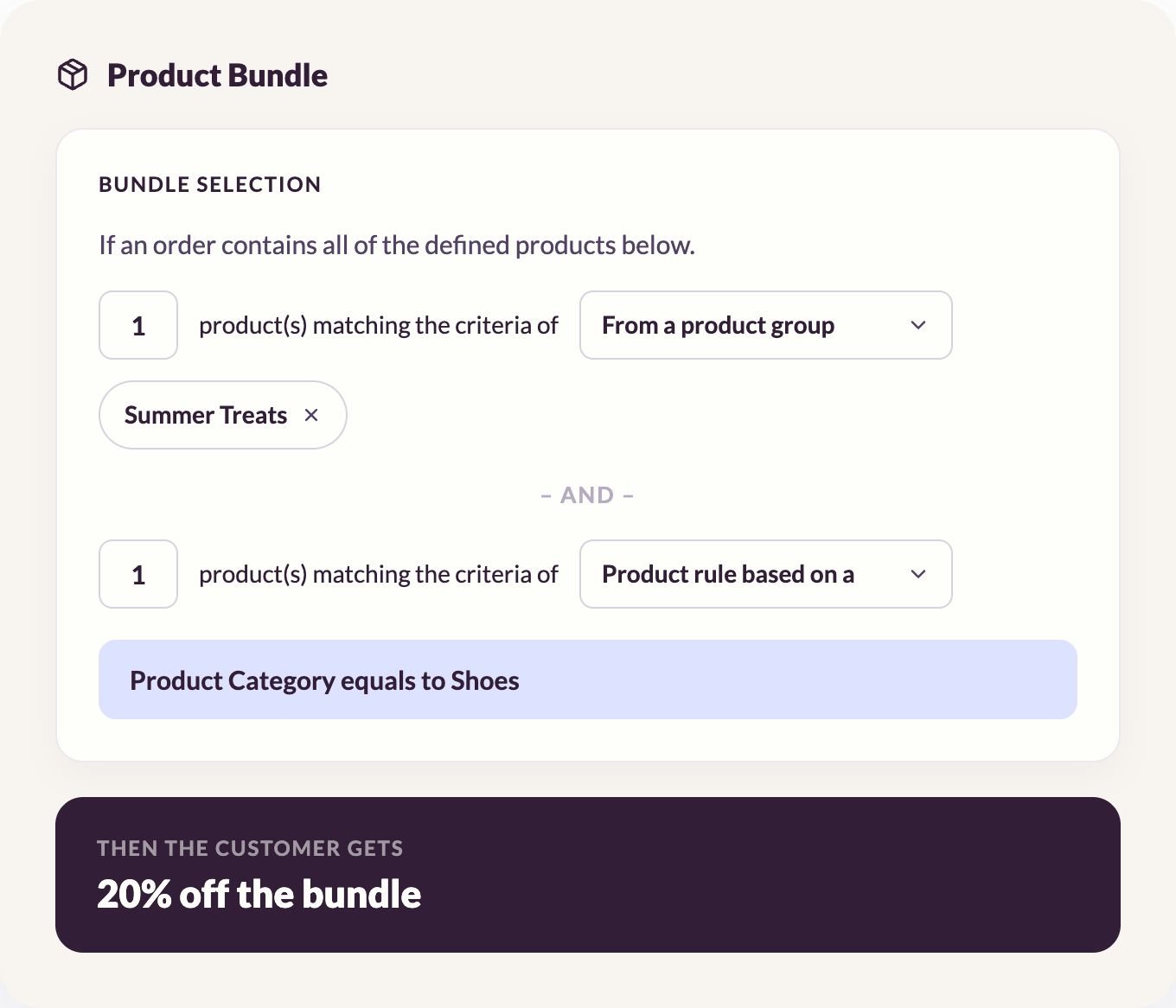
Example 3: Complementary Product Bundle with Minimum Spend
Goal: Increase average order value in an electronics retailer.
Qualification rule: Basket contains an item from [Category: Laptops] AND at least one item from [Category: Accessories] AND basket total exceeds £500.
Reward: £30 off the accessories total.
Why the minimum spend threshold matters: Without a floor, a customer could add a £5 cable alongside a laptop and claim the accessory discount. The minimum basket value protects margin while still incentivising the cross-category purchase you want.
Example 4: Loyalty-Gated Seasonal Bundle
Goal: Reward loyalty members with an exclusive bundle during a seasonal campaign.
Qualification rule: Basket contains at least two items from [Product Group: Christmas Gift Edit] AND customer status is [Loyalty Member: Active] AND order placed between [Date: 1 December] and [Date: 24 December].
Reward: Set bundle price applied (combined saving displayed at checkout).
Why loyalty gating matters: The same products are visible to every customer, but only verified loyalty members receive the bundle price. This creates a visible incentive to join the programme without requiring a separate campaign for each audience segment. The time-bound rule ensures the offer expires automatically without manual deactivation, and the loyalty qualification layer means the discount never leaks to customers outside the target segment.
How to Keep Product Bundles Exclusive
Not every bundle should be available to every customer. Four mechanisms control bundle access.
Unique codes per channel
Distributing a unique, single-use code to each partner, affiliate, or customer segment means the bundle offer is tied to that specific code. A code shared to loyalty members cannot be used by a general traffic visitor. Uniqodo's coupon code distribution tools generate unique, single-use codes at scale across 24 publisher partners and 7 affiliate networks, which means a partner-exclusive bundle stays exclusive without the marketing team manually creating and tracking code batches per channel.
Customer segment validation
Qualification rules can restrict a bundle to a specific customer segment, such as loyalty members, first-time buyers, or verified trade accounts, regardless of how the customer arrived at the offer. This layer sits on top of the channel and code controls, so a bundle can be both partner-distributed and loyalty-gated simultaneously.
Redemption limits
A bundle with no redemption cap on a viral channel is a liability. Setting per-customer and per-campaign redemption limits is a basic guardrail that should be configured at the same time as the qualification rule, not as an afterthought. This connects directly to preventing promotion abuse, which becomes a real operational risk once bundle offers reach any meaningful scale.
Common Product Bundling Mistakes
Overlapping product bundles with no priority order
When multiple bundle rules can fire on the same basket, you need a defined priority order. Without one, a customer might claim two bundle rewards simultaneously, or the wrong reward fires and creates a customer service issue. Define the priority hierarchy before launch, not after a customer flags the problem. Decide in advance whether rules stack or are mutually exclusive, and document which bundle takes precedence when qualification conditions overlap.
No margin floor on dynamic product bundles
Dynamic bundles are powerful precisely because they fire across many products automatically. That same flexibility means a badly configured rule can apply a generous discount to a low-margin product you never intended to include. Setting a minimum margin threshold or excluding specific product groups from bundle eligibility is not optional. It is the difference between a scalable promotion and a margin erosion event. The discount inventory without eroding margins guide covers this in more detail.
Treating product bundles as one-time configurations
Teams that hard-code each bundle as a separate technical implementation end up with a library of one-off campaigns that cannot be iterated on without developer involvement. The right approach is to build reusable rule templates that can be reconfigured for new campaigns without starting from scratch. A team that builds a "buy from category X and category Y, get 15% off the cheapest item" template can relaunch it for a new seasonal range by swapping the category values, rather than building a new promotion from scratch each time.
Why Product Bundling Needs a System, Not a Spreadsheet
The examples above share a common requirement: they need a promotion engine that can evaluate basket contents in real time against a set of rules, apply the correct reward, validate the customer's eligibility, and record the outcome for reporting.
Hard-coding each bundle into your platform's native discount functionality works for one or two campaigns. It does not work when you are running ten simultaneous bundles across multiple channels, each with different qualification rules, reward types, and distribution controls.
The question most e-commerce teams hit is whether to build that system internally or buy it. The build or buy guide covers that decision in detail. For most commercial teams, the answer comes down to one thing: how much engineering time are you willing to spend on promotion infrastructure versus the product itself?
A platform like Uniqodo sits above your existing stack and gives marketing teams the rule-builder flexibility to configure category-based bundles, attribute-level targeting, tiered rewards, and channel-specific distribution without a developer ticket for each campaign. The promotion experience platform handles qualification logic, reward application, code validation, and reporting in a single layer.
For teams evaluating their options, the best promotion engine software guide and the ecommerce promotion engine overview are useful starting points.
Product Bundling FAQs
How do you choose which products to bundle?
Start with products that are frequently purchased together or that serve a common use case. Then define the qualification rule based on category, brand, or product attributes rather than individual SKUs, so the bundle scales automatically as new products are added to those groups. The goal is a bundle that makes commercial sense for the buyer and can be maintained without updating a hard-coded product list for every new line.
What are the disadvantages of product bundling?
The main risks are margin erosion (discounting products you did not intend to), overlapping promotions firing simultaneously without a priority order, and customer resistance when a bundle includes items they do not want. Bundles that are too broadly defined or lack a minimum spend threshold can also reduce revenue on baskets that would have converted at full price anyway.
How do you bundle products together in a promotion engine?
You define two components separately: the qualification rule (what must be in the basket to trigger the offer) and the reward (what the customer receives when the rule fires). Qualification rules can target specific SKUs, product categories, brand attributes, basket value thresholds, or combinations of these. The reward can be a percentage off, a set price, a free item, or a product-specific discount. These are configured in the rule builder and apply automatically at checkout without manual intervention.
Can you run multiple bundle promotions at the same time?
Yes, but you need a defined priority order. When multiple bundle rules can qualify on the same basket, the system needs to know which one takes precedence and whether rewards stack or are mutually exclusive. Without that hierarchy, customers can claim unintended double discounts or the wrong reward fires. Define the priority structure before launch, not after a customer flags the problem.

Jenna Tyler
Director of Customer Operations